I was just ordering seeds for the spring season and trying to remember what I had grown in previous years. Seems like I had better write this all down before I totally forget. It’s a couple years later so some of this might be a bit vague.
Garden
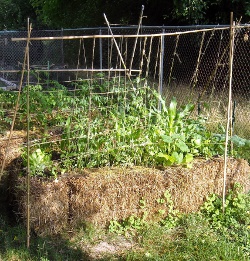
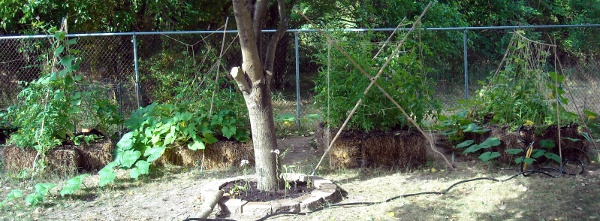
The dirt in our yard didn’t seem particularly attractive so we wanted to try some sort of cheap raised beds. Since we needed to improve the soil anyway we figured we’d try straw bale gardening and picked up a truck full of straw. The straw bales worked pretty well except they dry out fairly fast and it was a pretty dry summer so we had to water often. We formed the bales into hollow rectangles so we could fill in the centers with compost.
We picked up a $20 truck full and a bunch of free garbage cans full of compost from the compost center at Fairmount park. It was pretty good compost except you get a fair amount of plastic garbage bits scattered in it and I’m not sure whether or not the wilt problems we ran into came from the compost.
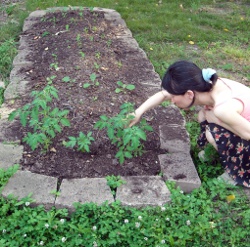
We also tried a little lasagna gardening (throw down newspaper/cardboard over grass, add a bunch of compostable stuff on top) in one bed. We mixed some of the compost with a bunch of old leaves and peat moss and put the plants in directly. It seemed to work quite well; no weeds and the plants were some of our best growers.
Tomato cages seemed expensive so we tried picking up some bamboo off craigslist. Driving home in a rented miniSUV with bamboo sticking 10 feet out the rear window was pretty funny. I used my vaguely remembered lashing and knot skills from Boy Scouts to make up some bamboo and twine trellises and tied off plants to them. It worked well except the bamboo broke a couple times and messed up any plants depending on them for support.
We picked up a few alpine strawberries from the Strawberry Store. The guy running that website has a lot of nice videos and information on alpine strawberries and sold us some really nice plants. The alpine strawberries were pretty cool with some tiny red, white and yellow strawberries. We got maybe a dozen strawberries per day from a handful of alpines (when the birds didn’t eat them). Just enough for a little treat. They seemed to grow really well in pots.
We also impulse purchased a blueberry bush and bought a few more off a farm in New Jersey. We kept them in big pots full of peat moss and pine bark. We got a few berries but the small ones were a bit too small to have many buds and many of the larger one’s berries were eaten by birds.
Seeds
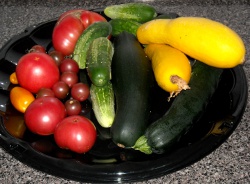
We ordered seeds from Park Seeds a bit too late in the season (and then it took a while for them to be delivered) so we got a bit of a late start. Just to keep a record, the seeds we got were:
- Eggplant Hansel Hybrid
- Maybe one or two eggplants. Not very successful.
- Bean Kentucky Blue
- A few beans but I think some critter was eating them because they never seemed to grow many leaves.
- Cucumber Alibi
- A few cucumbers but not a lot. It seemed like some flowers may not have been getting pollinated.
- Squash Summer Medley Hybrid Blend
- Got some zucchini from these but mildew killed them off early.
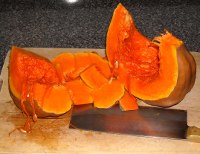
- Pumpkin Rumbo Hybrid
- This squash made huge vines all over the yard. It waited until the very last to make any fruits but we did end up getting a decent amount of very large squash. The squash lasted very well and we didn’t finish the last one until spring. Very tasty squash.
- Organic Chives
- Not sure whether the garlic chives or normal chives were successful but one of them gave us a few harvests and overwintered successfully.
- Garlic Chives
- Not sure whether the garlic chives or normal chives were successful but one of them gave us a few harvests and overwintered successfully.
- Cilantro Santo
- Very successful. Lots of leaves and lots of seeds. Probably should keep from flowering next year to get more leaves.
- Spearmint
- Kept these in a pot with the dill. They made lots of leaves and pushed out the dill.
- Dill
- Grew in a pot with mint since they’re supposed to be fairly invasive. Got a decent amount of dill leaves but no seeds and the mint pushed it out.
- Lemon Grass
- The grass grew ok in a pot but we never really got any big stalks like in the grocery store. Maybe need a longer growing season? Will try bringing it inside to overwinter next year.
- Basil Large Leaf Italian
- Lots of basil leaves and lots of basil seeds. Pretty successful.
- Lettuce Buttercrunch
- Apparently I’m not too good at growing lettuce. Got a few leaves.
- Spinach Melody Hybrid
- A few leaves but not too successful. Need to try out some other greens varieties.
- Tomato Heirloom Rainbow Blend
- Heirloom tomatoes sounded cool. We had big tomato plants coming along but then they all got knocked down by diseases and we really didn’t get much from them. Disease-resistant hybrids may be the way to go.
- Tomato Park’s Razzleberry Hybrid
- Got this one free with the seed order. We got a few tomatoes from it. It was supposed to be disease resistant but still died off from some sort of wilt.
- Tomato Chocolate Cherry
- We got a decent amount of cherry tomatoes off these but some sort of wilt killed them off from the ground up when there were still many tomatoes growing.
- Watermelon Shiny Boy Hybrid
- One tennis ball-sized melon that was bored into by bugs before we got to it.
- Pepper Fire Mix
- We started these a bit late so we didn’t get a ton of peppers. The ones we got were tasty. I didn’t realize you could bring peppers in before the first frost and overwinter them.
- Marigold Golden Guardian
- These marigolds were amazingly tough and large. They’re supposed to drive off nematodes but I can’t really vouch one way or another for that (our tomatoes had lots of problems but I don’t think nematodes were one of them). These flowers did make giant bushes and tons of seeds for the next year.
- Corn Bicolor Mirai 301BC
- Our corn was growing well then some sort of beetle bored into the plant halfway up the stalk and they all fell over and died. Corn takes up a ton of space (although it does look cool) so no more corn growing I think.
We also got a few packets from Walmart for around 50 cents each. None really worked.
Summary
For starting late, I think we got our garden going pretty well. We had a fair bit of disease problems so we’ll have to pick more disease-resistant varieties in the future. Also watering so frequently was a bit of a pain. But the fresh vegetables tasted great and the plants were fun to watch grow up so I think we’ll be growing again next year.
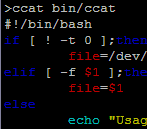 I was just quickly flipping through code on a terminal and got to thinking that it would be pretty handy to be able to syntax highlight when using